Definition
What AI quoting software does
AI quoting software reads a request for a price and drafts an itemized quote. The request can be an email, a PDF, a spreadsheet or a drawing. The draft has a quantity, a unit and a price on each line, and you approve it before it goes to the customer.
The prices are what separate the tools. A tool that prices from a generic average gives you a quote you have to rebuild. A useful one prices from your own past jobs and price lists, and tells you which lines it had no history for, so you know what to check.
Most quoting tools with an “AI” label do something smaller: they write the job description or the follow-up email, and you still type every line and price. Ask any vendor which part of the quote the AI writes, and where its prices come from.
Real quotes
What a Setell draft looks like
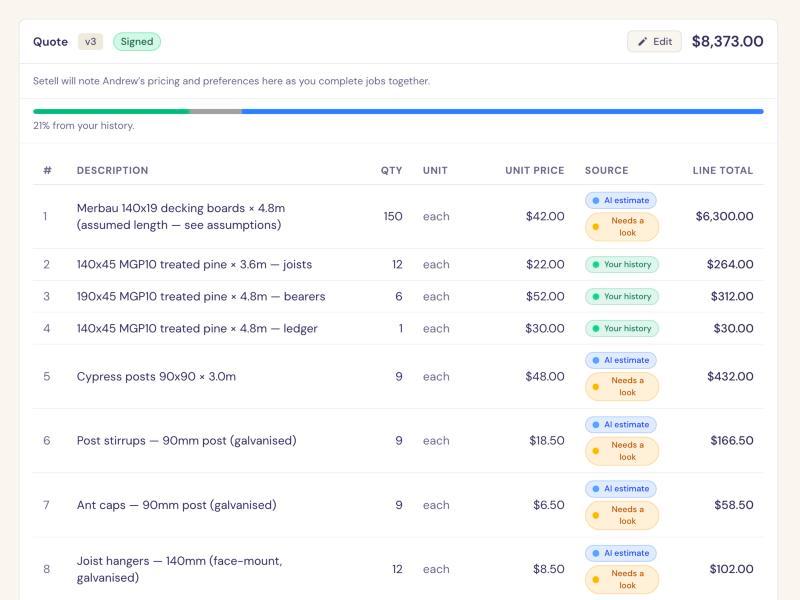
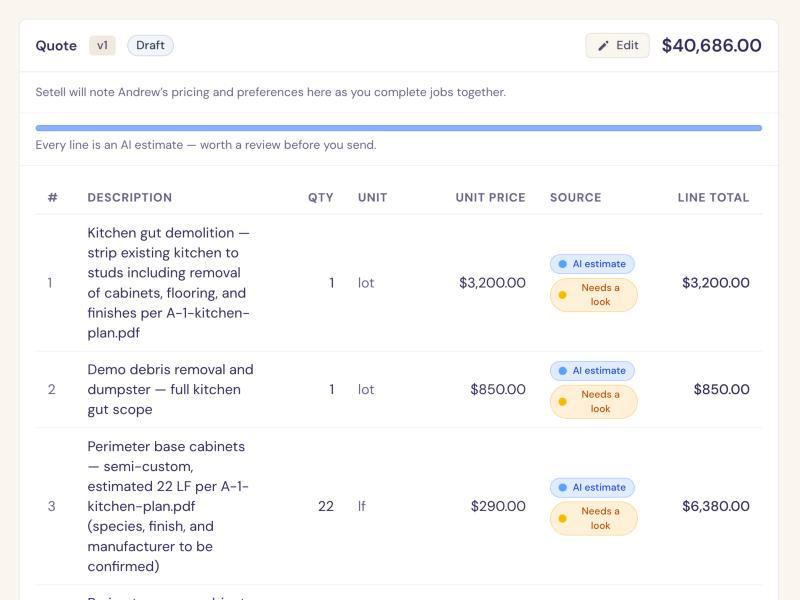
These are screenshots from go.setell.ai, not mockups. Every line has a source, so you can see which prices came from your history and which ones to check.
How it works
From the request to the invoice
Buying guide
What to check before you buy
Use these questions on any AI quoting tool, Setell included.
For contractors
AI quoting software for contractors
Contractors get bid requests by email, often with plans or a materials list attached, and the first clear quote often wins. Setell drafts the bid from the email and the attachments, so you can send it from your phone the same day.
- Change orders. Type what changed. Setell makes a new version of the quote and keeps the old one, so you and the customer can see what moved.
- Good, better, best. Setell can draft three options from one request. When the customer chooses, you select that option and it becomes the next version.
- Labor and material. Each line is marked as labor, material or other, and a supplier price sheet you upload sets your material cost.
- Invoice on approval. The signed quote becomes a QuickBooks or Xero invoice, so you don't type the job in again.
See how it works for your trade: contractors, HVAC, electricians, plumbers and roofers.
Compare
Setell vs Jobber, Housecall Pro and HandyQuoter
Jobber and Housecall Pro are field service suites: scheduling, dispatch, payments and quoting in one app. If you need dispatch, pick one of them. Setell does the quote and the invoice, and it's built around AI drafting from your own prices.
| Setell | Jobber | Housecall Pro | HandyQuoter | |
|---|---|---|---|---|
| Lowest paid plan | $49/mo (Business) | $29/mo billed yearly, $49 monthly (1 user) | $59/mo billed yearly, $79 monthly (1 user) | $14.99/mo (Premium) |
| Free plan | Yes, 3 AI quotes a month | Free trial | 14-day free trial | Yes |
| AI that drafts the quote | Included on every plan. Drafts each line from the request email, PDFs and drawings | Jobber AI (beta) creates quotes by voice in the mobile app. Included on all plans | Not stated. Its AI follows up on estimates you send | Voice-to-quote on Premium ($14.99/mo). Not on Free |
| AI that answers calls | No | Receptionist, $99/mo add-on for 100 conversations, then $0.79 each. Included on Plus | CSR AI call answering is a paid feature. Price not published | Not stated |
| Where quote prices come from | Your past quotes, invoices and price lists, with the source on each line | Your products and services list | Your price book | Not stated |
| Good / better / best options | Yes, every plan | Optional line items (Grow plan) | Options in estimates; proposal tool on Max | Not stated |
| Accounting sync | QuickBooks Online (every plan), Xero (Business and up) | QuickBooks Online (Connect and up) | QuickBooks Online and Desktop (Essentials and up) | Not stated |
| Scheduling and dispatch | No | Not stated |
Prices checked November 25, 2026 on each vendor's own website: Jobber, Housecall Pro, HandyQuoter. Prices change, so check before you buy. Comparing more tools? See Setell vs Jobber, Setell vs Housecall Pro and Setell vs ServiceTitan.
By trade
Best quoting software for your trade
Each comparison names the tools that trade actually shortlists, with every price linked to the vendor's own page.
- Best AI Quoting Agents in 2026, for Every Trade
- Best Cabinet and Countertop Quoting Software in 2026
- Best Commercial Cleaning Quoting Software in 2026
- Best Concrete Quoting Software in 2026
- Best Fence Quoting Software in 2026
- Best Flooring Quoting Software in 2026
- Best Garage Door Quoting Software in 2026
- Best Gutter and Siding Quoting Software in 2026
- Best Handyman Quoting Software in 2026
- Best Landscaping Quoting Software in 2026
- Best Lawn Care Quoting Software in 2026
- Best Machine Shop Quoting Software in 2026
- Best Metal Fabrication Quoting Software in 2026
- Best Painting Quoting Software in 2026
- Best Pest Control Quoting Software in 2026
- Best Pool Service Quoting Software in 2026
- Best Pressure Washing Quoting Software in 2026
- Best Sign Shop Quoting Software in 2026
- Best Solar Quoting Software in 2026
- Best Tree Service Quoting Software in 2026
- Best Window and Door Quoting Software in 2026
- Best Electrician Quoting Software in 2026
- Best Quoting Software for General Contractors in 2026
- Best HVAC Quoting Software in 2026
- Best Plumbing Quoting Software in 2026
- Best Roofing Quoting Software in 2026
- Best QuickBooks Quoting Software in 2026: 9 Tools Compared
FAQ
AI quoting, answered
What is AI quoting software?
AI quoting software reads a request for a price, such as an email, a PDF or a drawing, and drafts an itemized quote with quantities, units and prices. Good tools price from your own past jobs, show where each price came from, and wait for you to approve the quote before it goes to the customer.
How accurate are AI-drafted quotes?
As accurate as the prices behind them. Setell prices each line from your past quotes, your QuickBooks or Xero invoices, or a price list you upload. Where it has none of those, it uses an industry benchmark or marks the line as an AI estimate for you to check. Every line shows which one it used, and drafts move toward your prices with each quote your customers sign.
Will the AI send a quote without me?
Not unless you tell it to. By default Setell asks before it sends anything. On the Business and Pro plans you can turn on Trust or Auto mode for routine work, one type of action at a time.
How much does AI quoting software cost?
Setell is free for 3 AI quotes a month. Business is $49 a month for 50 quotes, and Pro is $99 a month for unlimited quotes. Every new account starts with 14 days of Pro and no credit card. AI drafting is part of every plan, not an add-on. Jobber and Housecall Pro start at $29 and $59 a month billed yearly and also do scheduling and dispatch. Jobber includes Jobber AI, which creates quotes by voice in its mobile app. AI call answering is an add-on at both: Jobber’s Receptionist is $99 a month on top of the plan, and Housecall Pro charges for CSR AI call answering without publishing the price. The comparison table on this page links to each vendor’s prices.
Is there AI quoting software for contractors?
Yes. Setell drafts bids from the request email and the plans attached to it, makes each change order a new version of the quote, and can draft good, better and best options from one request. The approved quote becomes an invoice in QuickBooks or Xero.
What can Setell read?
Email text, PDFs and CAD or STEP drawings, on every plan including Free. It drafts from what the customer sent, so you don’t fill in a form first.
Does it work with QuickBooks and Xero?
Yes. QuickBooks Online syncs on every plan, and Xero on Business and Pro. When a customer approves a quote, Setell creates the invoice in your accounting software.
Can I run it from ChatGPT or Claude?
Yes, on every plan, including Free. Setell is an MCP server, so Claude, ChatGPT, Codex and other MCP clients can draft, revise and send quotes and create invoices. Your approval setting still decides what goes to a customer.